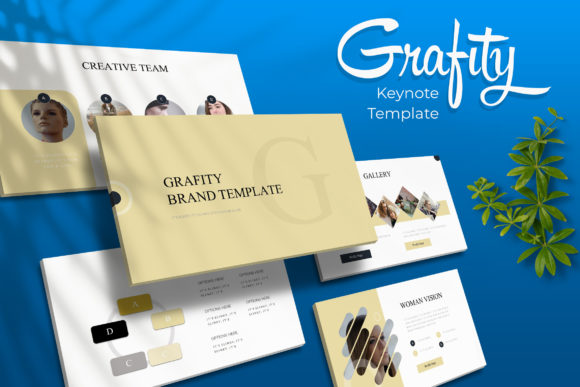
Grafity Keynote Template: Dynamic Presentation Design
Imagine transforming your next big pitch or creative brief into a visually stunning narrative that captures attention instantly. The Grafity Keynote Template offers a robust foundation for exactly that, providing a versatile design asset that blends modern typography with professional layout structure. Whether you are a designer finalizing a branding proposal or a startup founder outlining a business strategy, this collection of slides ensures your content looks polished and cohesive without requiring hours of manual formatting.
Unpacking the Design Flexibility
What makes the Grafity Keynote Template stand out in a crowded market of design assets is its sheer adaptability. The package includes over 150 total slides, thoughtfully distributed across five premade color themes. This structure gives you 30 distinct slides for each color variation, allowing you to switch the entire mood of your presentation with a single click. It is a practical solution for anyone needing to adhere to specific brand identity guidelines or simply experiment with different visual tones to see what resonates best with their audience.
The design philosophy here centers on pixel-perfect illustrations and handcrafted infographics. Unlike generic templates that rely on basic shapes, these elements are built to communicate complex data clearly. You will find section break slides that help structure your story logically, as well as dedicated gallery and portfolio slides. These latter sections are particularly useful for creative professionals who need to showcase high-resolution imagery without compromising on layout integrity.
Practical Features for Efficient Workflows
Efficiency is key in any design project, and this template addresses that directly through its technical build. Based on master slides, the entire file is organized to ensure consistency across every page. The graphics are fully resizable and editable, meaning you can adjust charts, icons, and diagrams to fit your specific data points. Furthermore, the picture placeholders utilize a drag-and-drop functionality. This feature is a significant time-saver, allowing you to insert your own photographs or illustrations seamlessly into pre-defined frames, ensuring your visuals are always perfectly cropped and aligned.
- Comprehensive File Inclusion: The download comes with 5 PPTX files optimized for widescreen formats.
- Typography Details: It includes a Readme file with a link to download the free font used in the design, ensuring you can maintain the intended aesthetic.
- Visual Focus: While the preview images are for illustration only, the slide structures are designed to make your own content the hero.
Matching the Template to Your Project
When selecting a presentation template, consider the specific needs of your project. The Grafity Keynote Template is particularly well-suited for corporate reports, creative portfolios, and marketing pitches where visual hierarchy is essential. The clean layout supports modern typography principles, ensuring that your text remains readable even when paired with complex infographics. It serves as a reliable canvas for editorial design presentations or showcasing product packaging concepts.
Think about the "flow" of your information. A good presentation guides the viewer’s eye naturally. The inclusion of section break slides in this collection helps you pause and reset the audience's focus between major topics. This prevents cognitive overload and keeps your narrative engaging. Whether you are presenting a new web design concept or a social media strategy, these structural elements help maintain a professional rhythm throughout your delivery.
Maximizing Visual Impact
To get the most out of this asset, focus on the interplay between text and imagery. The handcrafted infographics are designed to simplify data, so use them to break down statistics or timelines. For the portfolio slides, ensure your images are high-quality; the template’s grid system is built to handle high-resolution photography without slowing down the file performance. Remember that the goal of using a premium template is not just to look good, but to communicate more effectively. By leveraging the pre-built layouts, you can focus your energy on refining your message rather than worrying about pixel alignment.
Ultimately, the value of a tool like the Grafity Keynote Template lies in its ability to elevate your content. It bridges the gap between a rough idea and a polished final product. By providing a structured yet flexible environment, it empowers you to present your work with confidence, knowing that the visual foundation is solid, professional, and ready to impress.