Rest & Relax Google Slide Template: A Complete Design Kit
Imagine presenting your next big idea with slides that feel as calm and polished as a deep breath. That’s the experience the Rest & Relax Google Slide Template aims to create, offering a serene and professional foundation for any presentation.
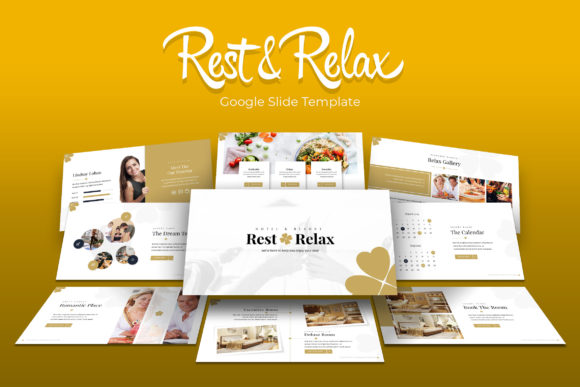
This isn't just a single set of slides. It’s a comprehensive design system built for versatility and visual harmony. With over 150 total slides across five premade color palettes, you have a wealth of resources at your fingertips. Each color variation includes 30 meticulously crafted slides, ensuring your presentations have both consistency and visual interest from start to finish.
Key Features for Effortless Design
The true value of a premium template lies in its flexibility and attention to detail. The Rest & Relax kit is designed to save you time while elevating your output. Its features are built around real-world use cases, from corporate reports to creative portfolios.
- Pixel-Perfect Illustrations & Infographics: Handcrafted visual elements help explain complex ideas simply. The dedicated section break slides and gallery/portfolio slides provide natural, elegant transitions between topics.
- Intuitive Editing: Built on master slides, the template ensures global changes are simple. Resizable, editable graphics and drag-and-drop picture placeholders mean you can customize layouts without starting from scratch.
- Cohesive Brand Identity: The consistent design language helps strengthen your brand identity. Using a unified color scheme and typography across all slides builds recognition and trust with your audience.
Practical Applications for Every Creator
While perfect for business pitches and annual reports, the template’s calming aesthetic suits a variety of projects. It’s an excellent design asset for professionals in wellness, education, architecture, or any field where clarity and a modern, clean look are paramount.
Consider using it for:
- Client-facing proposals and project updates
- Internal team training and workshop materials
- Conference talks and keynote presentations
- Portfolio showcases for designers and photographers
- Non-profit grant applications and fundraising decks
Tips for Maximizing Your Template
To get the most out of any Google Slide template, start by aligning it with your project’s mood. The “Rest & Relax” palette suggests a focus on clarity and calm, making it ideal for projects that benefit from a modern typography approach without overwhelming visual noise.
Always test your content on the slides. Ensure your key messages fit comfortably within the given text areas and that any custom images maintain the design’s balance. The included readme file and free font link are crucial first steps—they guarantee your presentation will look exactly as intended.
Finally, remember that a great template is a starting point. Use its structure to guide your narrative, but don’t be afraid to adjust elements to better tell your unique story. The goal is to let the design support your content, not overshadow it.
Choosing a well-designed presentation system like this one is an investment in your professional image. It streamlines your workflow, ensures visual consistency, and allows you to communicate ideas with greater impact and sophistication. When your slides look polished and intentional, your audience can focus entirely on the valuable information you’re sharing.